
How To Configure Automated Campaign Creation (ACC)?
Automated Campaign Creation (ACC) allows EVA Commerce Intelligence to automatically generate advertising campaigns based on predefined campaign templates and optimization rules.
Instead of manually creating campaigns for each product, ACC enables advertisers to define:
- Campaign creation settings
- Campaign creation conditions
- Product scope
Once configured, EVA can automatically create new campaigns according to these rules.
The Campaign Creation configuration process follows three main stages:
- Completing ACC Settings Setup
- Selecting Campaign Types
- Creating ACC Strategy Optimization Rules
Step 1: Open Campaign Creation
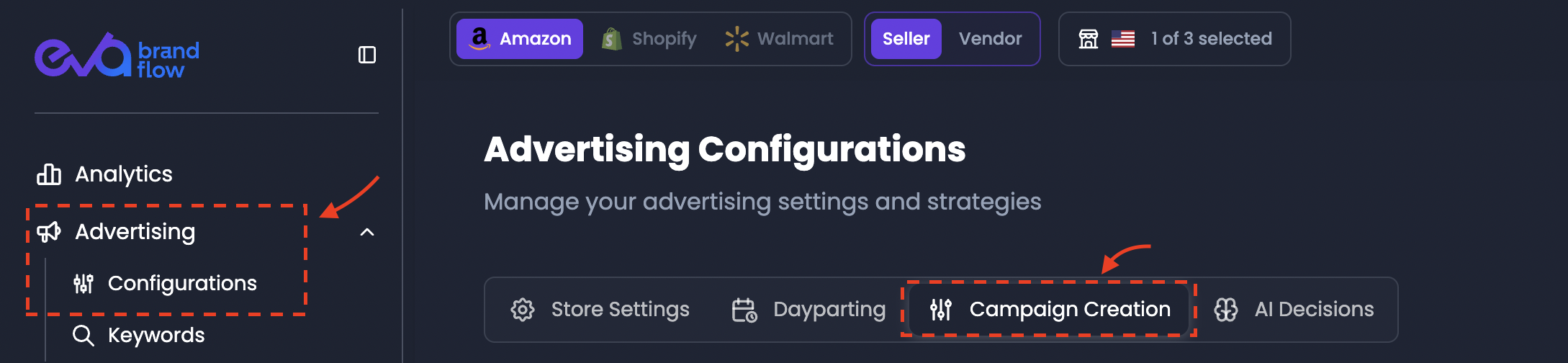
To access the campaign creation interface:
- Navigate to Advertising
- Click Configurations
- Select the Campaign Creation tab
This page is used to manage automated campaign creation strategies.
Step 2: Complete required ACC settings
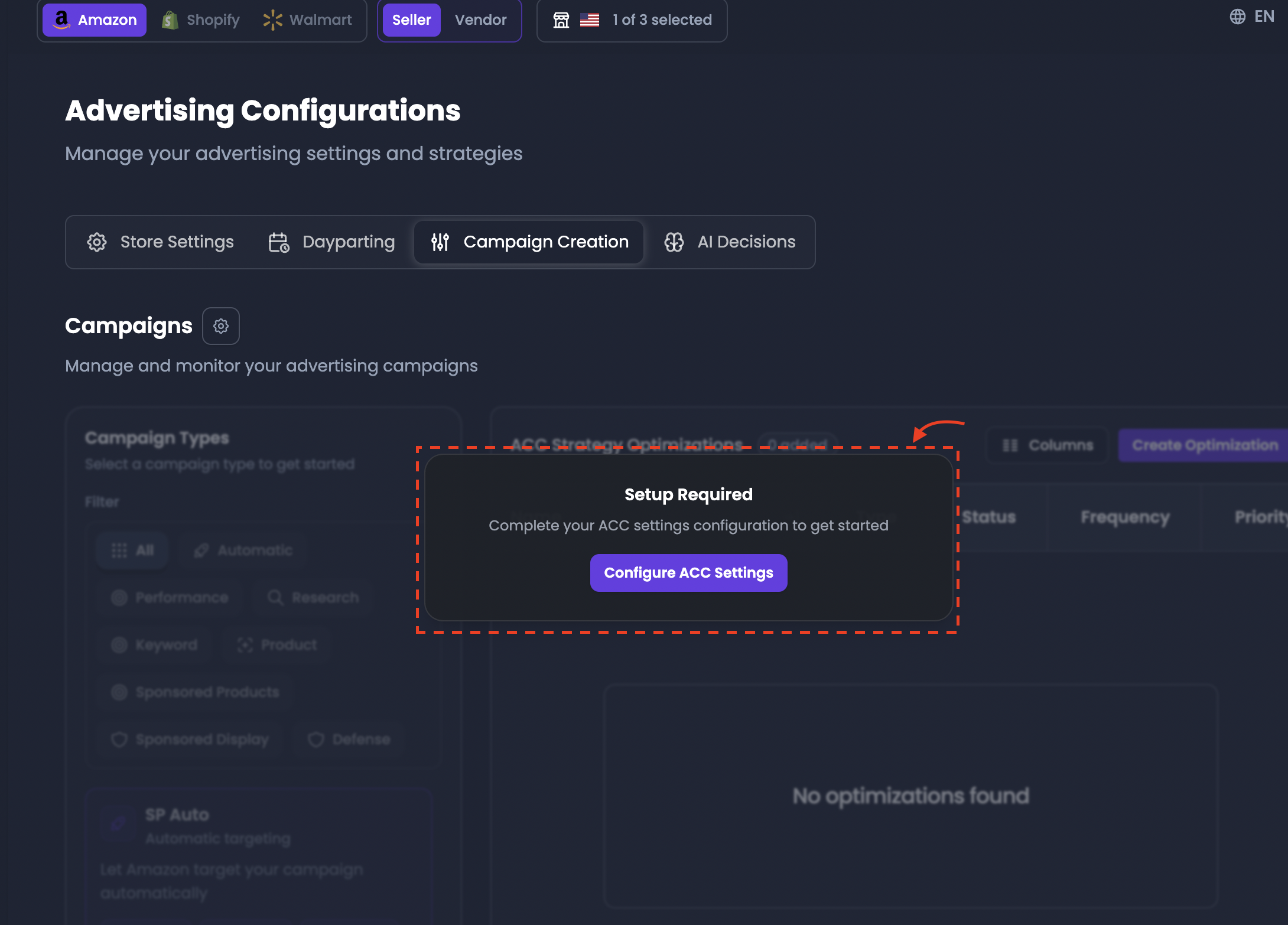
If ACC has not yet been configured, the system will display a Setup Required message.
This message indicates that the required campaign creation settings must be defined before automation rules can be created.
The interface will display the following prompt:
Setup Required
Complete your ACC settings configuration to get started.
Click Configure ACC Settings to open the configuration panel.
Step 3: Configure campaign creation settings
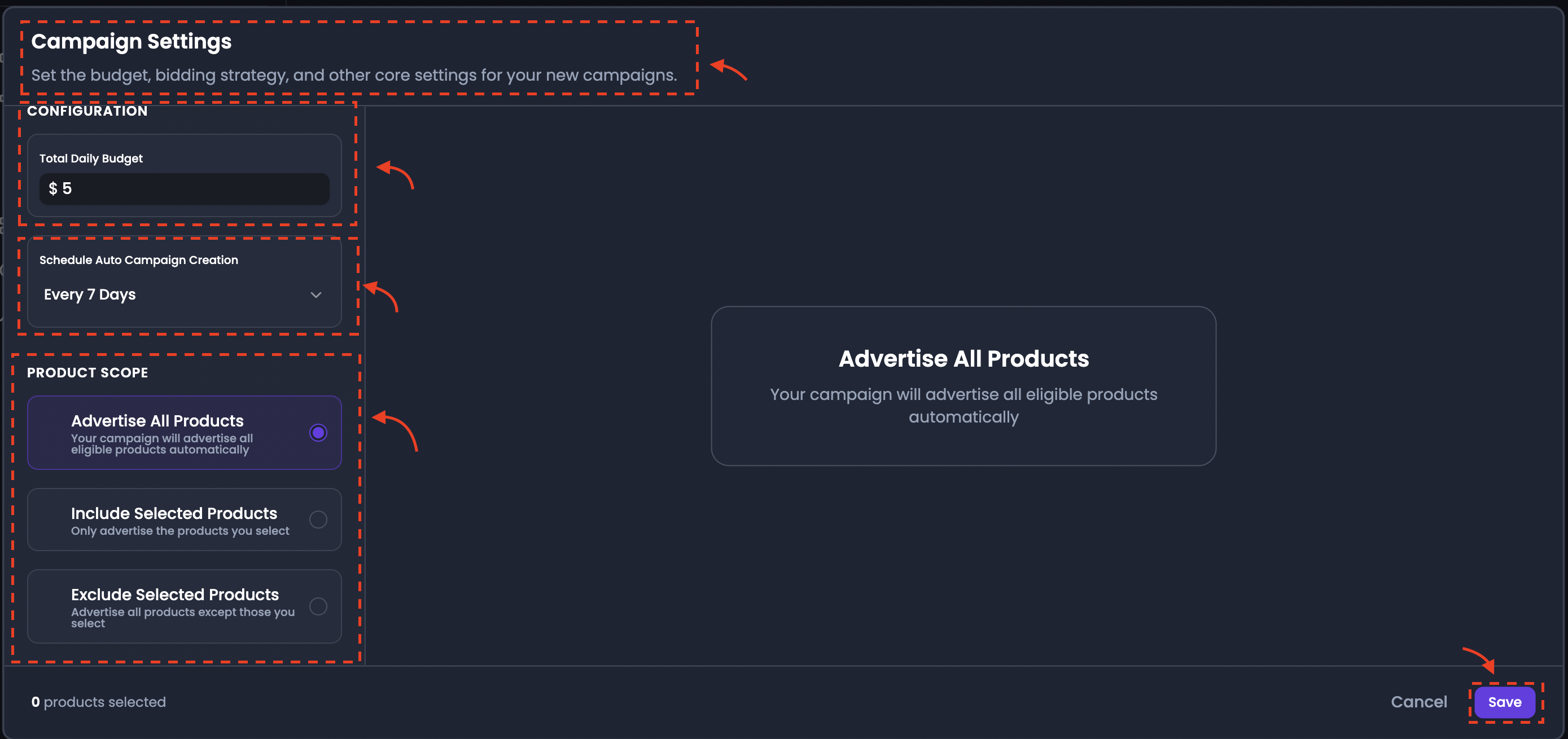
The ACC Settings panel defines the core parameters that control how automated campaigns are generated.
These settings establish the global configuration used by the automated campaign creation system.
The configuration panel contains the following sections:
Total Daily Budget
The Total Daily Budget defines the total amount of advertising budget that can be allocated to automatically created campaigns each day.
This value represents the maximum daily spend distributed across campaigns created by the automation system.
Example:
Total Daily Budget = $15
In this case, all campaigns generated by ACC together will not exceed $15 in daily spend.
Schedule Auto Campaign Creation
This setting determines how often EVA should generate new campaigns automatically.
Available scheduling options typically include intervals such as:
- Every 7 Days
- Every 14 Days
- Every 30 Days
At each scheduled interval, EVA evaluates the product scope you have defined and creates campaigns according to the configured rules.
Product Scope
The Product Scope defines which products will be included in automated campaign creation.
Three options are available:
A. Advertise All Products
This option allows EVA to create campaigns for all eligible products automatically.
No manual selection is required.
B. Include Selected Products
This option restricts campaign creation to only the products manually selected by the advertiser.
Only the selected products will receive automatically generated campaigns.
C. Exclude Selected Products
This option allows advertisers to exclude specific products from automated campaign creation.
Campaigns will be created for all other eligible products except the excluded ones.
After configuring these settings, click Save to activate ACC configuration.
Once saved, the full Campaign Creation interface becomes available.
Step 4: Select campaign types
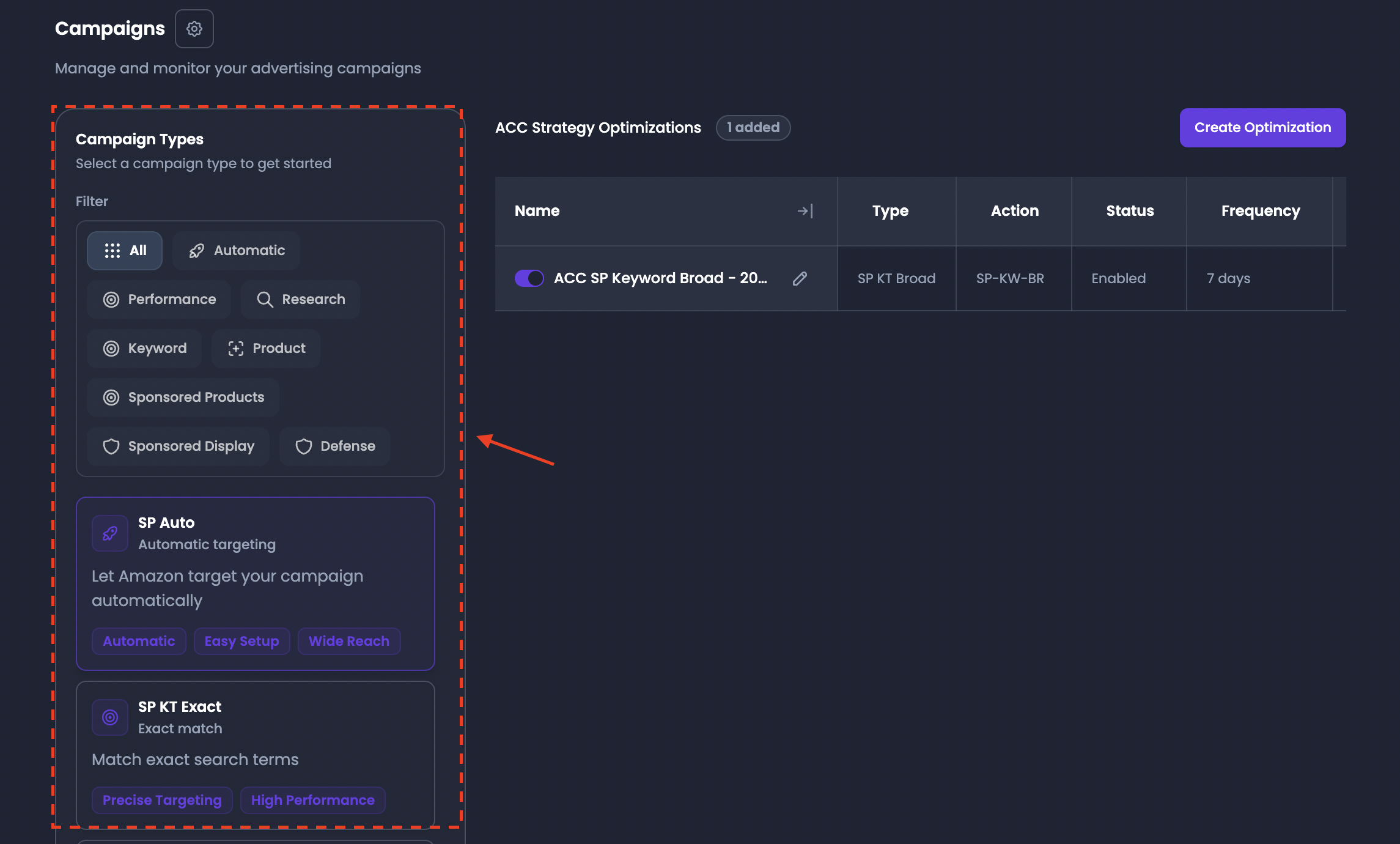
The Campaign Types panel defines which types of campaigns EVA can automatically generate.
Campaign types represent different advertising strategies based on targeting methods.
Filters allow campaign types to be categorized by strategy type.
Available filters include:
- All
- Automatic
- Performance
- Research
- Keyword
- Product
- Sponsored Products
- Sponsored Display
- Defense
Each campaign type represents a specific campaign structure.
Examples include:
Sponsored Products (SP) Auto
Automatic targeting campaigns where Amazon selects keywords and placements automatically.
These campaigns are typically used for broad discovery and wide reach.
Sponsored Products Keyword Targeting (SP-KT) – Exact
Exact keyword targeting campaigns designed for precise targeting of specific search terms.
Sponsored Products Keyword Targeting (SP-KT) – Phrase
Phrase match keyword campaigns that capture variations of specific keyword phrases.
Sponsored Products Keyword Targeting (SP-KT) – Broad
Broad match keyword campaigns designed to discover new search terms and expand keyword coverage.
Sponsored Products Product Targeting (SP-PT)
Product targeting campaigns that allow advertisers to target specific products or competitor listings.
Sponsored Products Product Targeting (SP-PT) – Defense
Defense campaigns allow strategic ad placement on your own product pages to minimize traffic leakage and ensure your brand remains the primary focus for shoppers.
Sponsored Display Product Targeting (SD-PT)
Sponsored Display campaigns allow advertisers to reach customers across Amazon’s display advertising network.
These campaigns are often used for visibility and brand awareness.
Research Campaign Types
Research campaign types use Search Query Performance Report (SQPR) data to discover new keyword opportunities.
Examples include:
- SP-KT Exact Research
- SP-KT Phrase Research
- SP-KT Broad Research
These campaigns help identify high-performing search queries that can later be converted into performance campaigns.
Step 5: Create ACC strategy optimization rules
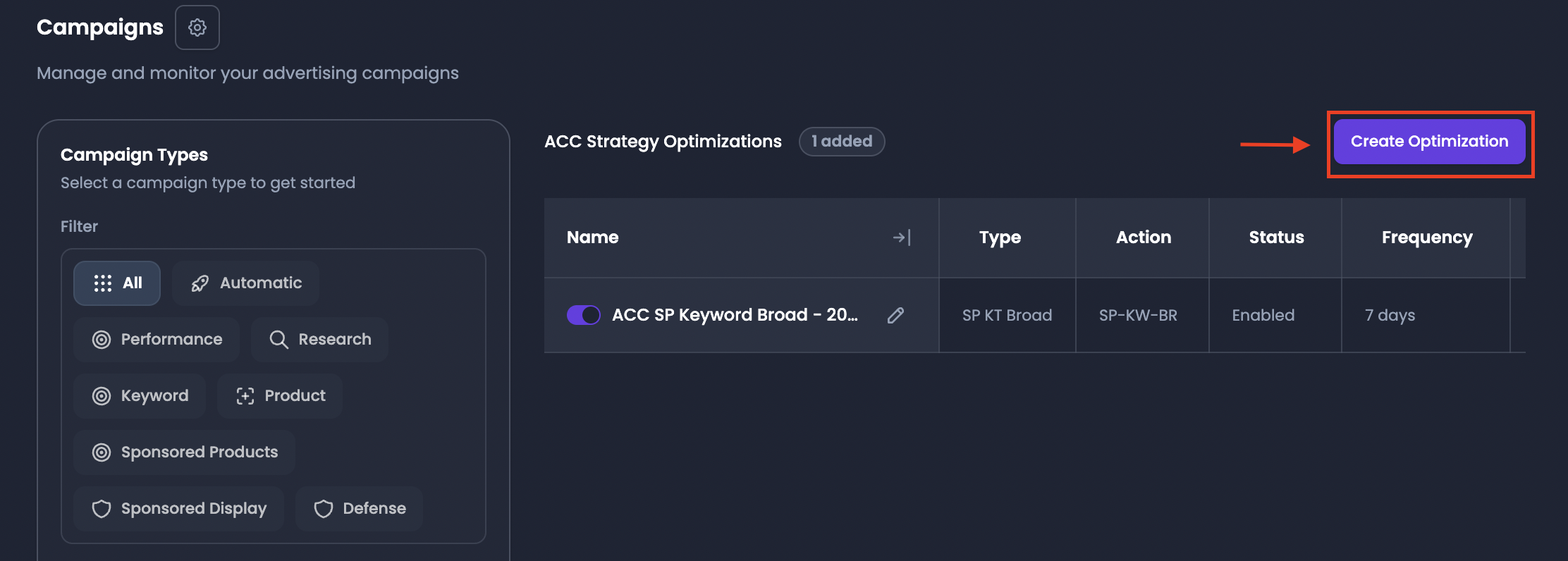
On the right side of the page, the ACC Strategy Optimizations section allows advertisers to create rules that control campaign creation behavior.
These rules define the logic used when the system generates campaigns.
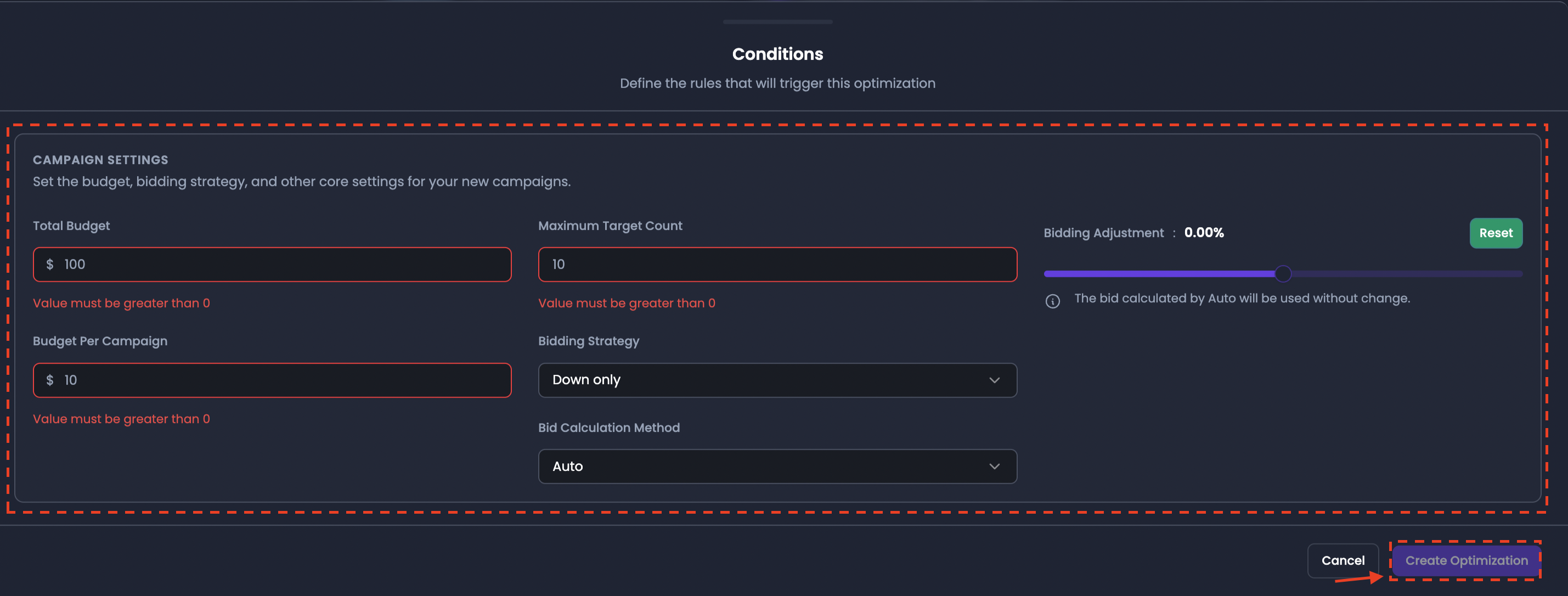
To create a rule:
- Click Create Optimization
- Configure the campaign template settings
- Define rule conditions
- Save the rule
Once saved, the rule appears in the ACC Strategy Optimizations table.
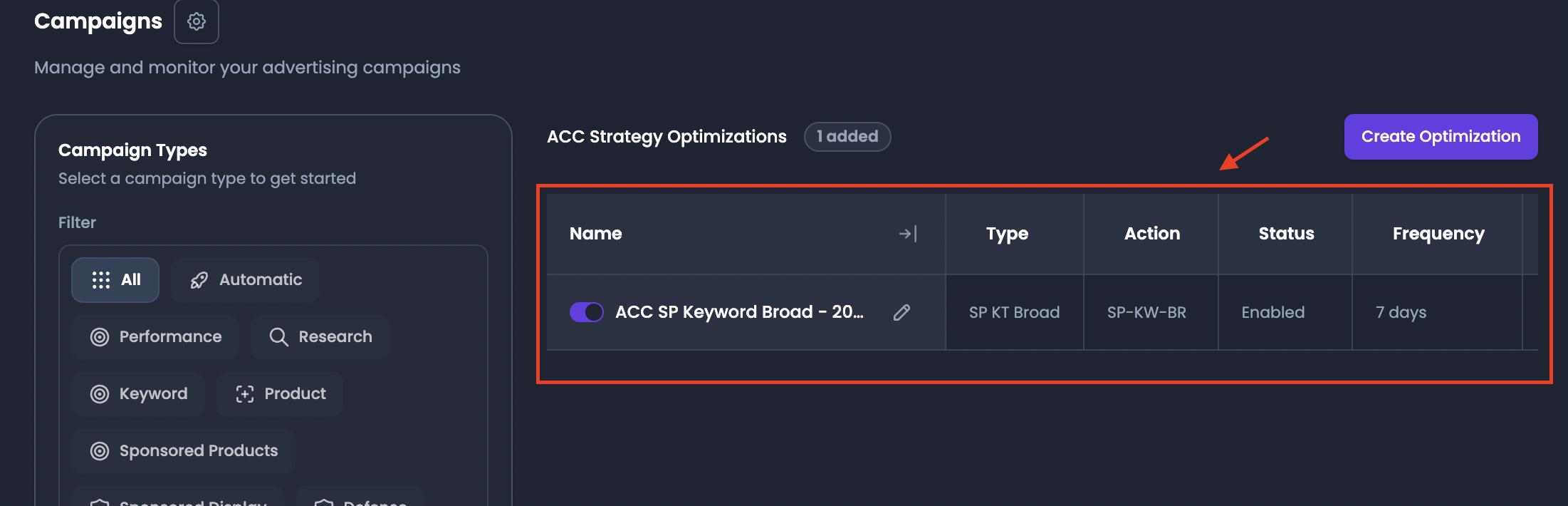
The table displays information such as:
- rule name
- type
- status
- frequency
- priority
- last update time
These rules determine when and how campaigns are created automatically.
Step 6: Configure campaign template settings
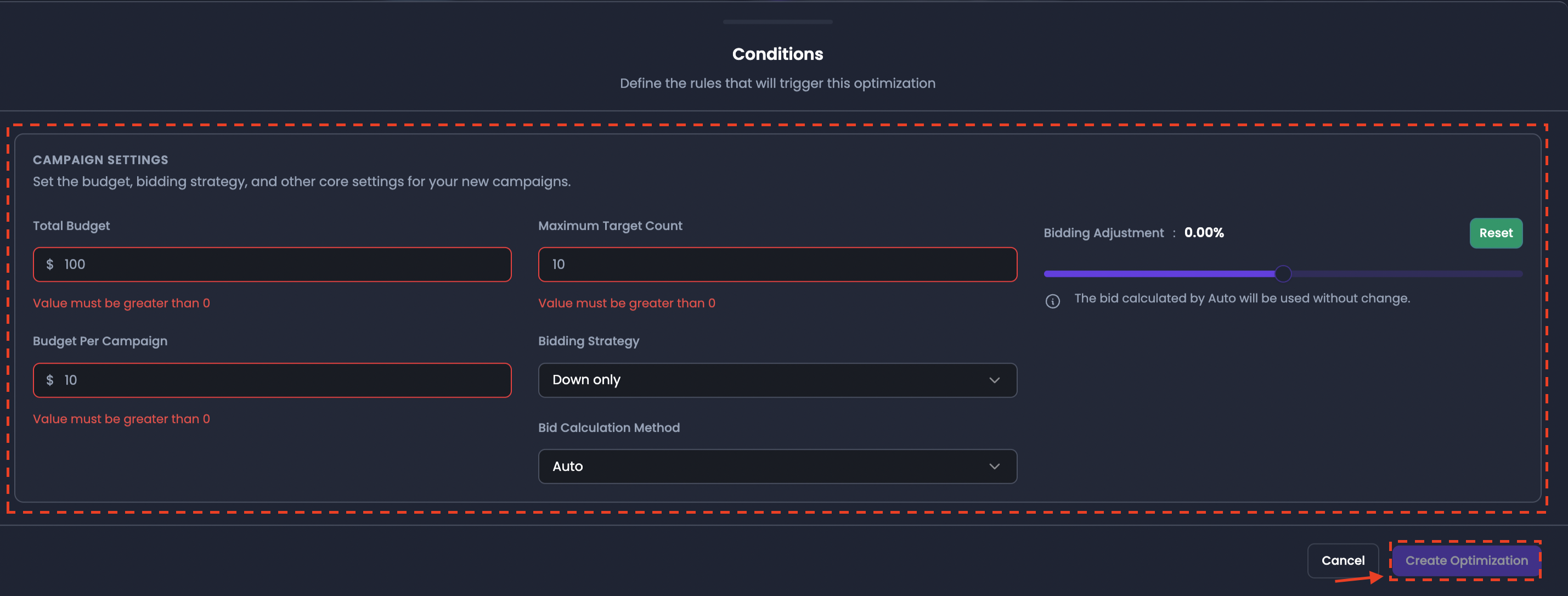
Total Budget
Defines the total advertising budget assigned to the campaign template.
Example:
Total Budget = $100
Budget Per Campaign
Defines the daily budget assigned to each individual campaign created by the system.
Example:
Budget Per Campaign = $10
If multiple campaigns are generated, each campaign will receive the configured budget value.
Maximum Target Count
Defines the maximum number of targets (keywords or product targets) that can be included in a single campaign.
Example:
Maximum Target Count = 10
This helps control the size and structure of automatically created campaigns.
Bidding Strategy
Determines how your bids are adjusted during real-time auctions. Select one of the following three strategies:
Down Only
With this strategy, Amazon may decrease bids when the likelihood of conversion is low but will not increase bids above the original amount.
Up - Down
With this strategy, Amazon may increase bids (up to 100%) for placements likely to convert and decrease bids when the likelihood of conversion is low. This is a more aggressive approach designed to capture high-value traffic.
Fixed
With this strategy, Amazon uses your exact bid for every auction and does not adjust it based on the likelihood of conversion. This provides the most control over your spend but requires manual optimization to remain competitive.
Step 7: Save the optimization rule
After configuring the campaign template and rule conditions:
- Click Create Optimization
- The rule will appear in the ACC Strategy Optimizations table.
Once active, EVA will automatically create campaigns according to the defined configuration and schedule.